
Format description: Catalog for frames, sunglasses, spectacle lenses, contact lenses and commodities
Catalog format and further document types
The catalog is the first part and basis for a set of documents to exchange data for the complete supply chain processes. In the catalog the supplier has the possibility to define all his products offering for a specific market. The catalog enables the supplier to describe the article with detailed information on different levels and for different use cases (technical information, marketing information, price information, relation to other resources).
In the catalog the complete delivery range of a product is described. Based on that in
an order only one valid configuration can be chosen to define a valid order.
History
Basis for this format version is the Spectaris Format which was developed from LOOK4 Company GmbH in cooperation with the German Industry Association SPECTARIS for contact lenses, started in 2004.
The file Catalog.xml - the product catalog
The structure
The format consists of the following central and standardised parts:
- Catalog.xsd:
XML schema to the catalog. Here the structure of the catalog is centrally defined. With this file the individual catalog of a manufacturer can be verified online. The file can be accessed here: https://templates.look4optics.com/v_1_13/catalog.xsd
- Templates.xsd:
the XML-scheme of the product feature list SpectarisTemplates.xml. The file can be accessed here: https://templates.look4optics.com/v_1_13/Templates.xsd
- Templates_contactlenses_v_1_13_2_EN.xml:
list of all standard features for the product group contact lenses. For each language there is a corresponding file.
- Templates_frames_v_1_13_5_EN.xml:
list of all standard features for the product group frames. For each language there is a corresponding file. https://templates.look4optics.com/v_1_13/v_1_13_frames/EN/Templates_frames_v_1_13_5_EN.xml
- Templates_lenses_v_1_13_2_EN.xml:
list of all standard features for the product group lenses. For each language there is a corresponding file. https://templates.look4optics.com/v_1_13/v_1_13_lenses/EN/Templates_lenses_v_1_13_2_EN.xml
- Templates_global_v_1_13_4_EN.xml:
list of all standardised, product group independent features. For each language there is a corresponding file. https://templates.look4optics.com/v_1_13/v_1_13_global/EN/Templates_global_v_1_13_4_EN.xml
You will find the Overview of Feature Templates here: https://mediathek.look4optics.com/ea4mw7ac.download
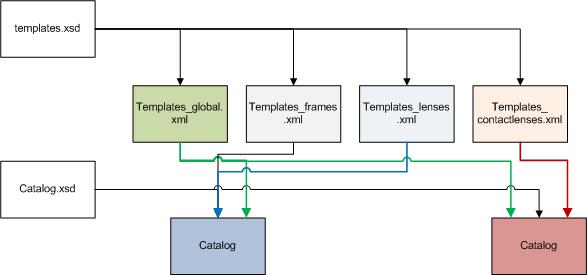
For sunglasses accordingly all three templates (global, frames and lenses) must be included.
Since the templates require frequent supplements, there are subversions (e.g. 1.13.2). These can be different depending on the template (e.g. frames, contactlenses). The release description here in the document is therefore based on the highest sub-version.
Overview of mandatory features per product group
The use of certain product properties is required for optimal processing and/or usage of the catalogs. Below you will find an overview of the mandatory features per product group.
Contact lenses
id |
includeInOrder |
|---|---|
CLConfigType |
hidden |
CLGeom |
hidden |
CLType |
hidden |
CLUsage |
hidden |
Material |
false |
For soft lenses (CLType = soft), the following features must be used
id |
includeInOrder |
|---|---|
NumberOfUnits |
false |
NumberOfUse |
false |
For care products (ArticleType=care), the following features must be used
id |
includeInOrder |
|---|---|
NumberOfUnits |
false |
UnitOfMeasure |
false |
For bottles (UnitOfMeasure=bottle) in addition
id |
includeInOrder |
|---|---|
UnitVolume |
false |
For accessories (ArticleType=accessory), the following feature must be used
id |
includeInOrder |
|---|---|
NumberOfUnits |
false |
Frames
id |
includeInOrder |
|---|---|
Brand |
false |
EanCode |
optional |
FosaLineID |
hidden |
FosaLineIDLabel |
hidden |
FrameColour |
true |
FrameDbl |
true |
FrameMaterialType |
false |
FrameRimType |
false |
FrameSearchColour |
hidden |
FrameShapeLength |
true |
FrameTempleLength |
true |
imgLarge |
(attribute) |
Line |
false |
LineLabel |
false |
UserGroup |
false |
Sunglasses
in addition
id |
includeInOrder |
|---|---|
LensColour |
false |
LensColourLabel |
false |
LensSearchColour |
hidden |
Frame temples
id |
includeInOrder |
|---|---|
EanCode |
optional |
FrameTempleColour |
false |
FrameTempleLength |
true |
FrameTempleMaterialType |
false |
FrameTempleSearchColour |
hidden |
imgLarge |
(attribute) |
Middle part
id |
includeInOrder |
|---|---|
EanCode |
optional |
FrameMiddlePartColour |
true |
FrameMiddlePartMaterialType |
false |
FrameMiddlePartSearchColour |
hidden |
imgLarge |
(attribute) |
Frame spare part
id |
includeInOrder |
|---|---|
FrameSparepartType |
hidden |
Rules for a uniform structure
Template names all get English names
Template names are written together as a basic principle
The first letter of an element is always written with a capital
The first letter of an attribute is always lowercase
Hyphens are waived
For improving readability word combinations are indicated by capital letters such as DeliveryRange / ProductCodingPattern / …
The template files
These files define all default product properties for a product group. Each product property has a unique label (TemplateId).
Here the common data element properties for all product properties are defined. They can be extended in the catalog by manufacturer specific product properties. For each data element the following information included in the data element list:
- id:
is the unique element name in the XML format. The element names are chosen English.
- includeInOrder:
Order relevant or descriptive property (product information).
Valid values of includeInOrder:
true: Order relevant / is transferred with the order
false: Not order relevant >> descriptive property (product information)
optional: Optional product property can be specified and will then be transmitted in the order record
hidden: Product grouping feature > product grouping invisible in SW surfaces
Attributes
- label:
Feature description in its respective language
- step:
Step size of the values
- formatString:
Formatting of the field
- unit:
Unit of the product property
- alwaysSigned:
Indication always with prefix (e.g. sph / cyl as indication in an application; default value = false)
Example code:
<FeatureValueTemplate id="AxisComplete" includeInOrder="true" label="&t_AxisComplete;"
  step="1" formatString="N0" unit="°" descr="&t_AxisComplete_descr;
  alwaysSigned="false" />
The element Catalog
The product catalog is the basis for all other types of applications like order or order response.
General catalog information
The catalog begins with the definition of general information about the catalog:
Attribute |
Type / Use |
Description / Example |
|---|---|---|
|
|
Catalog description (e.g. |
|
|
Catalog ID provided by supplier (e.g. |
|
|
Currency (e.g. |
|
|
Currency symbol (e.g. |
|
|
Catalog name (e.g. |
|
|
Major version number for the description of the current schema version (e.g. |
|
|
Minor version number for the description of the current schema version (e.g. |
|
|
Indication if test catalog (e.g. |
|
|
ID for the version (content) by the supplier (e.g. |
|
|
Description of the version (content) by the supplier (e.g. |
|
|
Valid to date (e.g. |
|
|
Valid from date (e.g. |
Example code:
<Catalog xsi:noNamespaceSchemaLocation= "https://templates.look4optics.com/v_1_13/Catalog.xsd" xmlns:xsi="http://www.w3.org/2001/XMLSchema-instance" name="Fossil frames and sunglasses product catalog" catalogID="catalog_de_de.xml" version="2018 -Test1.0" currency="EUR" currencySymbol="€" validStartDate="2018-06-01T15:30:47.0000000+01:00"> <ValidCountries> <ValidCountry isoCountryCode="EN"/> </ValidCountries> </Catalog>
Following the general header data the catalog is divided into the following areas:
ValidCountries:Indication for which countries it is valid
Supplier:Supplier file data
Templates:Definition of properties later used for article description
Articles:Description of the unique article
Navigation:Navigation (optional)
The element Supplier
Within the element Supplier all information about the supplier/manufacturer
are defined. The element Supplier has the following attributes:
Attribute |
Type / Use |
Description / Example |
|---|---|---|
|
|
Link to terms (e.g. |
|
|
Management (e.g. |
|
|
Name (e.g. |
|
|
Supplier CoC number (e.g. |
|
|
Supplier number (Vat number) (e.g. |
|
|
Supplier tax no. (e.g. |
|
|
Supplier VAT number (e.g. |
Example code:
<Supplier supplierID="DE811449478" vatID="DE811449478"
  name="best frames GmbH">
Different addresses and bank details of suppliers can be defined as additional information:
Example code:
<Supplier>
    <Addresses>
        <Address label="Mainaddress" name="best frames GmbH"
          street="Dorfstr. 2-4" zip="79280" city="Au" isoCountryCode="DE"
          phone="0761-40 10 510" fax="0761-40 10 51 22"
          email="info@best-frames.de"/>
        <Address label="Service Center" name=" best frames GmbH"
          street="Dorfstr. 2-4" zip="79280" city="Au" isoCountryCode="DE"
          phone="0761-40 10 51 55" fax="0761-40 10 51 33"
          email="info@best-frames.de "/>
    </Addresses>
    <BankAccounts>
        <BankAccount bankName="Volksbank Münster" eban="EBAN1" swift="SWIFT1"
          accountNo="12643" bankCode="455100" street="Bertoldstraße 4"
          zip="79116" city="Münster" isoCountryCode="DE"/>
        <BankAccount bankName="Sparkasse Hamburg" eban="EBAN2" swift="SWIFT2"
          accountNo="4943645" bankCode="45543645" street="Westplatz 56"
          zip="12345" city="Hamburg" isoCountryCode="DE"/>
    </BankAccounts>
</Supplier>
The element Templates
Include
At the beginning stands the row Include. From this results the integration of
the files for the different article groups with the centrally defined default
product characteristics. The included files are:
Templates_frames_v_1_13_5_EN.xml
Templates_lenses_v_1_13_2_EN.xml
Templates_global_v_1_13_4_EN.xml
Templates_contactlenses_v_1_13_2_EN.xml
With further Include tags it is possible to include files for further
product groups in which product properties are described that aren’t defined in
the standard.
The definition of further properties and relations takes place subsequently and is divided into the following areas:
Feature templates
Here you are able to define own product properties that aren’t included in the standard.
This can be done also in a separate file PrivateTemplates that is also
included with the tag Include.
Standard-Features
You will find the list of the FeatureTemplates in the Template
documentation.
FeatureEnumTemplateEx
For some features the value ranges can’t be defined in the standard because they are catalog or supplier specific. The most important cases would be e.g. material or colour specifications which are vendor-specific and therefore must be defined on catalog level. In the FeatureEnumTemplateEx area, corresponding assignments (e.g. color code and colour label of the supplier) can be defined.
Example code:
<FeatureTemplateEx templateID="Line">
    <LabeledValue value="FUSION" label="FUSION"/>
    <LabeledValue value="KICK" label="KICKER"/>
    <LabeledValue value="KIDSP" label="KIDSPORT"/>
    <LabeledValue value="OPTICS" label="OPTICS"/>
    <LabeledValue value="PERF" label="PERFORMANCE"/>
    <LabeledValue value="SNAKES" label="SNAKES"/>
</FeatureTemplateEx>
Resources for FeatureEnumValues
Version 1.5 created the ability to attach resources to single LabeledValues.
The allocation can be done globally in the general definition range under
FeatureTemplateEx and FeatureTemplate or for individual articles
(schema extension in template.xsd).
This means that for a specification of a product property (e.g. color = red) one or more product views of the red article variant can be linked. Thus, you can visualize individual product versions respectively properties.
Example code 1:
<FeatureTemplateEx templateID="Color">
    <LabeledValue value="A41" label="bright green (clear pupil)">
        <Resources>
            <Resource templateID="imgMedium"
              uri="https://mediathek.look4optics.com/zdyh7rna.view"/>
            <Resource templateID="imgSmall"
              uri="https://mediathek.look4optics.com/kfdxe4ra.view"/>
        </Resources>
    </LabeledValue>
    <LabeledValue value="A41X" label="dark green (clear pupil)"/>
</FeatureTemplateEx>
Example code 2:
<FeatureTemplates>
    <FeatureValueTemplate step="0" formatString="N0" unit="mm"
      alwaysSigned="false" id="FrameTempleLength" label="Temple length"
      labelShort="" descr="" includeInOrder="false"/>
    <FeatureValueTemplate step="0" formatString="N0" unit="mm"
      alwaysSigned="false" id="FrameShapeLength" label="Shape length"
      labelShort="" descr="" includeInOrder="false"/>
    <FeatureValueTemplate step="0" formatString="N0" unit="mm"
      alwaysSigned="false" id="FrameShapeHeight" label="Frame shape height"
      labelShort="" descr="" includeInOrder="false"/>
    <FeatureValueTemplate step="0" formatString="N0" unit="mm"
      alwaysSigned="false" id="FrameShapeMaxRadius" label="Shape max radius"
      labelShort="" descr="" includeInOrder="false"/>
    <FeatureValueTemplate step="0" formatString="N0" unit=""
      alwaysSigned="false" id="LensBaseCurve" label="Base curve" labelShort=""
      descr="" includeInOrder="false"/>
    <FeatureValueTemplate step="0" formatString="N0" unit="mm"
      alwaysSigned="false" id="FrameDbl" label="Bridge width" labelShort=""
      descr="" includeInOrder="hidden"/>
    <FeatureEnumTemplate id="Lining" label="Lining" labelShort="Lining"
      descr="Lining" includeInOrder="false">
        <LabeledValue value="Chopper gray" label="Chopper gray">
            <Resources>
                <Resource templateID="imgMedium"
                  uri="https://mediathek.look4optics.com/h3yz4rca.view"/>
                <Resource templateID="imgSmall"
                  uri="https://mediathek.look4optics.com/dhwxmffa.view"/>
            </Resources>
        </LabeledValue>
    </FeatureEnumTemplate>
</FeatureTemplates>
DefaultValues
The defaultValue generally applies to the entire article or to specific delivery ranges. A combination is not possible. DefaultValues can only be available for order-relevant features, not for optional or other feature types.
Example code:
<Features>
    <FeatureValue templateID="EdgeFlattening" deliveryTypeID="STD" defaultValue="0.3"
    rangeMin="0.3" rangeMax="0.5" rangeStep="0.2" includeZero="false" />
</Features>
Relationship templates
Here possible kinds of product relationships (including spare parts, accessories, option item, alternative product …) are defined. They can be used later in the article area to define relations between articles (e.g. article E and F are spare parts of article A).
Standard:
id |
label |
|---|---|
|
Accessory |
|
Alternative product |
|
Consists of |
|
Fitting temples |
|
Optional article |
|
Product variant |
|
Spare part |
Resource templates
Here different kinds of resource files can be defined:
id |
mimetype |
Max. size |
label |
|---|---|---|---|
|
html/php |
360 degree animation |
|
|
html |
Delivery range info |
|
|
txt |
Form data 36 points |
|
|
txt |
Form data 360 points |
|
|
mo1 |
Form data of tracer Essilor |
|
|
nid |
Form data of tracer NIDEK |
|
|
oma |
Form data of tracer OMA |
|
|
wec |
Form data of tracer WECO |
|
|
xml |
Form data XML |
|
|
html |
Handling info |
|
|
image/jpg |
Preview Frame colour |
|
|
image/jpg |
Image frame front |
|
|
image/jpg |
Image frame half side left |
|
|
image/jpg |
Image frame half side right |
|
|
image/jpg |
Image frame left |
|
|
image/jpg |
Image frame right |
|
|
image/jpg |
1024X1024px |
Large image (e.g. pop-up window) |
|
image/jpg |
200/200px |
Medium-sized image (e.g. for article description) |
|
image/jpg |
80/80px |
Small image (e.g. for product lists) |
|
image/jpg |
80/80px |
Small inactive image (e.g. fotos with white layer) |
|
html |
General product description |
|
|
txt |
Form data ID |
|
|
html |
Technical info |
We suggest defining the path information in the header for each resource type as entities. So the path information can be centrally defined once and adjusted at any time with a record.
Example code:
<?xml version="1.0" encoding="UTF-16"?>
<!DOCTYPE ResourcePath [
<!ENTITY imgLPath "https://www.firmaXY/pics/">
<!ENTITY imgMPath "https://www.firmaXY/pics/">
<!ENTITY imgSPath "https://www.firmaXY/pics/">]>
The mapping at Article looks like that:
Example code:
<Resources>
    <Resource templateID="imgLarge" uri="&imgLPath Produkt_ImgL.jpg"/>
    <Resource templateID="imgSmall" uri="&imgLPath Produkt_ImgS.jpg"/>
</Resources>
DeliveryType templates
Here the global definition of different delivery areas takes place.
id |
label |
priority |
|---|---|---|
|
Ex stock |
10 |
|
Fabrication standard |
20 |
|
Fabrication individually |
30 |
The following rules apply to the evaluation:
A higher priority beats a lower
If selecting a feature with higher priority (lower value) the complete product will receive this delivery type
Example code:
<DeliveryTypeTemplates>
    <DeliveryType id="STANDARD" priority="1" label="STANDARD"/>
</DeliveryTypeTemplates>
ClientGroup templates
Definition of individual customer groups that are assigned to each product
under Article.
This allows controlling permissions and views of individual products for a product group or automatic creation of individual catalogs for different product groups from a centrally maintained master catalog.
Example code:
<ClientGroups>
    <ClientGroup templateID="Client group 1"/>
    <ClientGroup templateID="Client group 2"/>
</ClientGroups>
Articles
Here the detailed description of each item takes place. An article can have the following attributes:
Attribute |
Type / Use |
Description / Example |
|---|---|---|
|
|
Article code that has been used before for this article (e.g. in other ERP systems) (e.g. |
|
|
Number of configuration rows (contact lenses=2, glasses=2 > in pairs, commodity=1) (e.g. |
|
|
Article description (e.g. `` Biocompatible, highly compliant spherical monthly exchange system for daily, extended wear``) |
|
|
Unique supplier article ID (e.g. |
|
|
Maximal order quantity of article (e.g. |
|
|
Minimal order quantity of article (e.g. |
|
|
Article name (e.g. |
|
|
Article price, purchase price (e.g. |
|
|
Step size for order quantity (e.g. |
|
|
Valid to date (e.g. |
|
|
Valid from date (e.g. |
|
|
Default value = true |
Example code:
<Article id="SLOD30" name="SofLens one day 30er Box"
  descr="One day contact lens" price="19.90" maxQuantity="1" configLines="2">
The article definition is divided into the following areas:
ClientGroups: assignment to client groups > e.g. for indication of Private LabelsMetaData: definition of search terms and additional links to products, e.g. for evaluation in applicationsRelationships: definition of product relations > e.g. spare parts/accessoriesResources: assignment of resource files to the product, e.g. pictures, HTML or PDF documents, shape data etc.Features: definition of unique product propertiesDeliveryRanges: definition of the delivery ranges per product, at frames possible model variants
ClientGroups
Mapping of individual customer groups to the article. Hereby can be defined for which customer groups the article is available.
So the indication of individual products for individual customers can be controlled (e.g. in the supplier’s own shop or an industry software) or used as the basis for creating special catalogs for customer groups (such as individual catalogs for purchasing groups).
Example code:
<ClientGroups>
    <ClientGroup templateID="Client group 1 "/>
</ClientGroups>
MetaData
Here, more properties can be mapped to the product. This allows e.g. the realisation of search functions in applications (such as keyword search in electronic product catalog or shop). These data generally are not displayed but rather serve evaluation or as additional information. Another application is the definition of “control flags”, e.g. for parameter passing at software.
Example code:
<MetaData>
    <Meta name="keywords" value="Special goggle; Filter category;... "/>
    <Meta name="Author" value="Henry Smith"/>
</MetaData>
Relationships
Here relationships between articles can be defined. Besides the standard relations also individual relation types can be defined (for individual applications).
Example code:
<Relationships>
    <Relationship templateID="accessory" articleID="Special case"/>
</Relationships>
Resources
Here the definition takes place of the information that is available for the product in external files (resources). In addition to the standard resource types also own resource types (for ind. applications) can be defined.
Example code:
<Resources>
    <Resource templateID="productInfo"
      uri="https://www.rodenstock.de/de/1234-50_PI.html"/>
    <Resource templateID="imgMedium"
      uri="https://mediathek.look4optics.com/e2dr2zza.view"/>
    <Resource templateID="imgSmall"
      uri="https://mediathek.look4optics.com/z23znc3a.view"/>
    <Resource templateID="imgSmallUnselected"
      uri="https://mediathek.look4optics.com/xnwyzfpa.view"/>
</Resources>
Features
The product properties of individual products are assigned with Features.
Standard properties (centrally defined in Templates.xml) but also vendor-specific
properties can be assigned (e.g. for use in vendor-specific applications).
Again counts the distinction in FeatureValue- (assignment of a numerical value) and
FeatureEnum- items (select list of multiple values - colours, brands, characteristics …).
Example code:
<Features>
    <FeatureEnum templateID="ArticleType" deliveryTypeID="STANDARD"
      includeInOrder="false">
        <FeatureEnumItem value="sunglasses"/>
    </FeatureEnum>
    <FeatureEnum templateID="Brand" deliveryTypeID="STANDARD"
      includeInOrder="false">
        <FeatureEnumItem value="Bollé"/>
    </FeatureEnum>
    <FeatureEnum templateID="Line" deliveryTypeID="STANDARD"
      includeInOrder="false">
        <FeatureEnumItem value="Fusion"/>
    </FeatureEnum>
    <FeatureEnum templateID="UserGroup" deliveryTypeID="STANDARD"
      includeInOrder="false">
        <FeatureEnumItem value="unisex"/>
    </FeatureEnum>
    <FeatureEnum templateID="FrameRimType" deliveryTypeID="STANDARD"
      includeInOrder="false">
        <FeatureEnumItem value="fullRim"/>
    </FeatureEnum>
    <FeatureEnum templateID="FrameMaterialType" deliveryTypeID="STANDARD"
      includeInOrder="false">
        <FeatureEnumItem value="metal"/>
    </FeatureEnum>
    <FeatureEnum templateID="FrameRx" deliveryTypeID="STANDARD"
      includeInOrder="false">
        <FeatureEnumItem value="true"/>
    </FeatureEnum>
    <FeatureEnum templateID="FrameBridgeType" deliveryTypeID="STANDARD"
      includeInOrder="false">
        <FeatureEnumItem value="padsSilicon"/>
    </FeatureEnum>
    <FeatureEnum templateID="FrameSpringHinge" deliveryTypeID="STANDARD"
      includeInOrder="false">
        <FeatureEnumItem value="true"/>
    </FeatureEnum>
    <FeatureEnum templateID="NickelFree" deliveryTypeID="STANDARD"
      includeInOrder="false">
        <FeatureEnumItem value="false"/>
    </FeatureEnum>
    <FeatureEnum templateID="CountryOfOrigin" deliveryTypeID="STANDARD"
      includeInOrder="false">
        <FeatureEnumItem value="FR"/>
    </FeatureEnum>
</Features>
DeliveryRanges
Here the delivery ranges are defined. DeliveryRanges are limited product
features or combinations of features. It is necessary to keep in mind, that at
least one switch feature for each block exists, on which all other features
refer to and that the ranges don’t overlap with values in other delivery
ranges.
Values/ranges which are valid for the complete product are defined under
Features (general features).
Specific use for frames
The filing of single possible model variants takes place as single delivery ranges. Delivery ranges are limited product properties or combination of properties. For shop applications it is often desired to combine to an article products whose basic properties are identical (models) and differ in the version that is to say only in some product properties. This combination can be mapped on the definition of different delivery areas.
An article then corresponds to a model (a frame) which is available in different configurations (different sizes, colors, temple variants).
Ranges which generally apply to the entire product are defined under features (general product properties).
Conventions for the filing of model variants
Frames and sunglasses are usually offered in different model variants. This means that a frame is available in different versions (e.g. model Birdland with 2 lens sizes, 2 bridge sizes and 5 different colours).
Model variants are maintained by the suppliers as individual items and therefore have an internal article number and/or an EAN/UPC code for each model variant (SKU). For the order, the specification of one of these unique (SKU) article IDs is sufficient. Some companies may also offer ordering by specifying model and characteristics (e.g. color, size).
Also for frames characteristics can be defined as order-relevant via the attribute
IncludeInOrder. These features (at least EAN code or internal article number) are then
transferred for the order.
That is, the supplier can define for each item which product properties must be given for the unique definition of a model variant if ordering shall not be done with an SKU ID. This is especially true for manufacturers who do not use SKU IDs (EAN/UPC codes).
Rules for the definition of DeliveryTypes
A higher priority beats a lower
If selecting a feature with higher priority (lower value) the complete product will receive this delivery type
Example code:
<DeliveryRange>
    <Features>
        <FeatureEnum templateID="InternalArticleID"
          deliveryTypeID="STANDARD" includeInOrder="false">
            <FeatureEnumItem value="10017"/>
        </FeatureEnum>
        <FeatureEnum templateID="LensMaterialType" deliveryTypeID="STANDARD"
         includeInOrder="false">
            <FeatureEnumItem value="polycarbonate"/>
        </FeatureEnum>
        <FeatureEnum templateID="LensColour" deliveryTypeID="STANDARD"
          includeInOrder="false">
            <FeatureEnumItem value="Polarized Sandstone"/>
        </FeatureEnum>
        <FeatureEnum templateID="Availability" deliveryTypeID="STANDARD"
          includeInOrder="false">
            <FeatureEnumItem value="immediately"/>
        </FeatureEnum>
        <FeatureEnum templateID="FrameColour" deliveryTypeID="STANDARD"
          includeInOrder="false">
            <FeatureEnumItem value="Matte Bronze"/>
        </FeatureEnum>
        <FeatureEnum templateID="EanCode" deliveryTypeID="STANDARD"
          includeInOrder="true">
            <FeatureEnumItem value="0054917232412"/>
        </FeatureEnum>
        <FeatureValue templateID="FrameTempleLength"
          deliveryTypeID="STANDARD" value="125" includeInOrder="false"/>
        <FeatureValue templateID="FrameDbl" deliveryTypeID="STANDARD"
          value="18" includeInOrder="false"/>
        <FeatureValue templateID="FrameShapeLength"
          deliveryTypeID="STANDARD" value="64" includeInOrder="false"/>
        <FeatureValue templateID="FrameShapeHeight" deliveryTypeID="STANDARD"
          value="36" includeInOrder="false"/>
        <FeatureValue templateID="FrameMaxRadius" deliveryTypeID="STANDARD"
          value="66" includeInOrder="false"/>
        <FeatureValue templateID="DeliveryTime" deliveryTypeID="STANDARD"
          value="1" includeInOrder="false"/>
        <FeatureValue templateID="SalesPrice" deliveryTypeID="STANDARD"
          value="129" includeInOrder="false"/>
    </Features>
    <Resources>
    <Resource templateID="imgMedium"
      uri="https://mediathek.look4optics.com/e2dr2zza.view"/>
    <Resource templateID="imgSmall"
      uri="https://mediathek.look4optics.com/z23znc3a.view"/>
    <Resource templateID="imgSmallUnselected"
      uri="https://mediathek.look4optics.com/xnwyzfpa.view"/>
    </Resources>
</DeliveryRange>
Price calculation
The mapping of product prices takes place with a base price per product and price differences (markups and markdowns for single product properties features).
The following rules apply for pricing for a product configuration:
Defining the type of delivery for the entire configuration. If selecting a feature with higher priority (lower value) the complete product will receive this delivery type.
Addition of all selected features.